• Skip to main content
  • Skip to header right navigation
  • Skip to site footer
Howcast

Howcast

The best source for fun, free, and useful how-to videos and guides.

  • Arts & Crafts
  • Entertainment
  • Food & Drink
  • Health
  • Home & Garden
  • Relationships
  • Explore Guides
  • Contact
  • About
  • FAQs
  • Explore Guides
  • Arts & Crafts
  • Entertainment
  • Food & Drink
  • Health & Wellness
  • Love & Relationships
  • Home & Garden
Arts & CraftsHow to Take Better Photos

How to Control White Balance & Master Color

Transcript

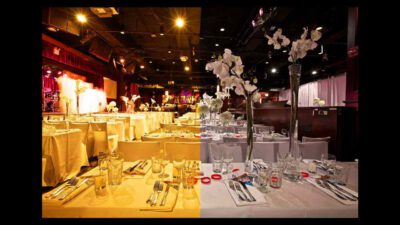
Your camera has a feature called automatic white balance. For the most part, it’s pretty good, it can tell the difference between different sorts of light. What white balance is, is color determined in degrees Kelvin. The higher the white balance, the warmer the photograph. For example, this photograph here. The white balance was set for an outdoor or natural light, so what we ended up getting, was a very yellow image. Every now and then, you might have found a yellow image on your camera, and thought, “Hey, it didn’t look that yellow.” Or, conversely, you might have found a blue image. A blue image happens when we’re outside, using an indoor white balance setting.

On your camera, your white balance settings are generally automatic white balance: sunny, shady, cloudy, uh, tungsten or incandescent, depending on your type of camera, and fluorescent lighting as well. You can also customize your white balance, either from an [inaudible 00:56], or from changing the degrees Kelvin. But let’s keep it simple. If your photo is yellow, you need to move it to an indoor white balance, like tungsten, incandescent, or fluorescent lighting.

If your photo is extremely blue, you need to move it to an outdoor white balance, like, for example, sunny, shady, or cloudy. This photo indoors with an outdoor white balance, needs to change to an indoor white balance setting, so let’s move it over to the tungsten setting on the camera, and we see that the color changes dramatically. Changing our white balance just a little bit can completely alter the feel of a photograph, and get the color correct.

Lessons in this Guide

Photography Lessons with Luke Ballard

How to Take Green Screen Photos

What to Look for When Buying a Camera

How to Understand Different Camera Lenses

How to Take Shots for a Photo Series

3 Fun Ways to Improve Night Photography

3 Tips for Photographing Pets

How to Take Better Photos of Kids

How to Take Photos of a Mother with Her Newborn

How to Tell a Story in a Portrait

How to Use Your Phone as a Camera

How to Take Better Selfies

How Filters Affect Your Photography

How to Control White Balance & Master Color

How to Find a Macro Photo Subject

How to Instagram Better Food Photos

Top 3 Shutter Speed Secrets

How to Blur & Not Blur in Sports & Action Photography

Best Aperture for Sports / Action Photography

Top Tip for Better Travel Photos

Emphasizing Foreground in Landscapes

Using Reflections in Landscape Photos

Featuring People in Landscape Photography

Best Aperture for Landscape Photography

3 Wedding Photography Background Tips

How to Pose One, Two, Three & More People for Photos

6 Tips for Photographing Large Groups of People

How to Style & Pose a Glamour Model

Best Aperture for Portrait Photography

Quick & Easy Event Lighting

How to Take Candids at a Party or Event

How to Digitally Process a RAW Negative

How to Manually Expose Your Aperture

How to Manually Expose Your Shutter Speed

How to Manually Expose Your ISO

What Is the Rule of Thirds in Photography?

Copyright © 2026 · Howcast · All Rights Reserved · Powered by BizBudding Ventures with Springwire.ai

Privacy Manager