• Skip to main content
  • Skip to header right navigation
  • Skip to site footer
Howcast

Howcast

The best source for fun, free, and useful how-to videos and guides.

  • Arts & Crafts
  • Entertainment
  • Food & Drink
  • Health
  • Home & Garden
  • Relationships
  • Explore Guides
  • Contact
  • About
  • FAQs
  • Explore Guides
  • Arts & Crafts
  • Entertainment
  • Food & Drink
  • Health & Wellness
  • Love & Relationships
  • Home & Garden
Arts & CraftsHow to Take Better Photos

How to Take Green Screen Photos

Transcript

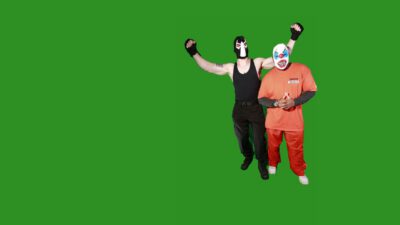
Greenscreen photography can be a really technical, complex procedure. Having said that, it can also be quite simple. Firstly, it doesn’t need to be green. Any solid color with contrast will allow you to select the subjects in your photograph to transport them to something else. It’s also really important to try and pick good backgrounds. Something that’s going to suit. This was taken from ComicCon, where a lot of cosplayers are running around, having a fantastic time, as were we, taking their photographs. So, with something like that, I wanted a, a psychotic background to put it on, as you can see. What you’ve got to be careful of, when you’re working with greenscreen, is that you are getting every element using, you can use the magic wand tool in PhotoShop, you can use the quick selecter tool. I like quick selecter.

And that let’s you pick just what you need, and remove what you don’t need, from the photograph. Like I said, it doesn’t need to be green. Any color that’s contrasting against your subject will allow you to select it. Once it’s selected, it’s quite simply a matter of copying it on to a new layer, and ammending any of the lighting that you need, or the exposure that you need, so that it blends nicely in with your background. At the end of the day, you want the background and the foreground to appear fairly seamless. But it is a lot of fun. You can take photos of yourself and put them in Egypt, or put them in Paris. Have a bit of fun with greenscreen, have a bit of fun with Photoshop layers.

A final thing to keep in mind, when you’re shooting with greenscreen, is to keep your subjects evenly and well lit. Keep it as uniform as possible. Any shadows that you have appearing on your greenscreen are going to make it a little bit harder for you to select that part of the image. If there is a little bit of shadow at the feet, it’s okay to leave that in because, at the end of the day, we want a level of three dimensionality in our photograph.
Lessons in this Guide

Photography Lessons with Luke Ballard

How to Take Green Screen Photos

What to Look for When Buying a Camera

How to Understand Different Camera Lenses

How to Take Shots for a Photo Series

3 Fun Ways to Improve Night Photography

3 Tips for Photographing Pets

How to Take Better Photos of Kids

How to Take Photos of a Mother with Her Newborn

How to Tell a Story in a Portrait

How to Use Your Phone as a Camera

How to Take Better Selfies

How Filters Affect Your Photography

How to Control White Balance & Master Color

How to Find a Macro Photo Subject

How to Instagram Better Food Photos

Top 3 Shutter Speed Secrets

How to Blur & Not Blur in Sports & Action Photography

Best Aperture for Sports / Action Photography

Top Tip for Better Travel Photos

Emphasizing Foreground in Landscapes

Using Reflections in Landscape Photos

Featuring People in Landscape Photography

Best Aperture for Landscape Photography

3 Wedding Photography Background Tips

How to Pose One, Two, Three & More People for Photos

6 Tips for Photographing Large Groups of People

How to Style & Pose a Glamour Model

Best Aperture for Portrait Photography

Quick & Easy Event Lighting

How to Take Candids at a Party or Event

How to Digitally Process a RAW Negative

How to Manually Expose Your Aperture

How to Manually Expose Your Shutter Speed

How to Manually Expose Your ISO

What Is the Rule of Thirds in Photography?

Copyright © 2026 · Howcast · All Rights Reserved · Powered by BizBudding Ventures with Springwire.ai

Privacy Manager