Transcript
Let’s talk a little bit about raw files versus jpeg files on your camera.
Your camera has the ability to take a photo in jpeg, compress it, and have all this beautiful color, saturation, vibrancy information stored in the file.
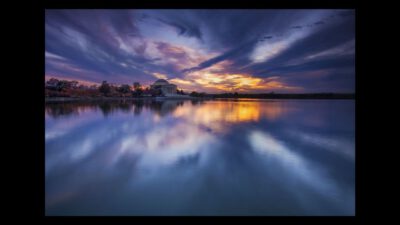
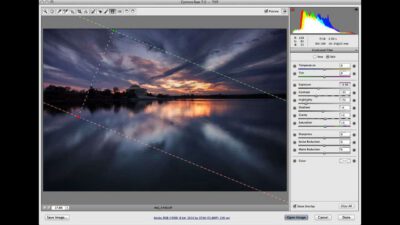
However, what we want to do is take the photo in raw. It’s the same with processing. Jpeg was like taking your roll of film to Rite Aid for that one hour quick development, whereas raw processing is more like going into a dark room and playing with the chemicals and the process and dodging and burning yourself. If photography is an addiction, Photoshop and processing has become, I guess, the methadone of photography. Let’s just have a quick look at how simply, easily, and let’s also talk about sparingly I process my raw images. The first thing I want to do with my raw image is just increase the exposure just a little bit. As you can see around here, I’ve got quite a bit of darkness just next to the Jefferson memorial.
I just want to bring my exposure up just a little bit, just to cover some of that darkness. Downside of that is I’m getting a few more highlights and blowouts as you can see here by the red of the screen. Next thing I want to do is just increase the contrast just a little bit, just to offset some of what I did there with the exposure before. I just want to increase the clarity just a little bit and the vibrancy just a little bit. A lot of people think that processing raw is cheating. Like I said, this is exactly what we used to do in a dark room when processing film.
The next thing I want to do is just bring in just a little bit of a graduated filter. I used one when I took the photograph but what I’m going to do is just add another one now just to help control those highlights and just give the sky a little bit more. Because my subject is on the left, notice I’m bringing it over just to keep the clarity there over what I’ve already highlighted. The next thing I’m going to do is use my adjustment brush.
This is used in the same way we used to use dodging and burning in film, just to give a little bit more selective control over the darkness and also the lights the way we used to do it. The next thing I want to do is just increase my noise reduction. Obviously, playing with a lot of the process settings here in camera raw have just created a little bit of noise, almost like we had an high ISO and just by controlling it that simply we now control how our image turned out. So we can compare it with the one we processed. So there we have the original and the beautifully processed image in comparison. So by processing our raw image we have a lot of control how the image turns out. Like I said, it’s not something we want to overdo. If Photoshop is methadone, then think of the serenity prayer. Give us the serenity to accept that we could not change the sky on the day, the wisdom to know when to Photoshop, and the courage to turn it off.